基于 MUSA 的 huggingface 模型分布式训练
2024-05-09
1.引言
Huggingface 起初是一家总部位于纽约的聊天机器人初创服务商,他们本来打算创业做聊天机器人,然后在 github 上开源了一个 Transformers 库,虽然聊天机器人业务没搞起来,但是他们的这个库在机器学习社区迅速大火起来。目前已经共享了超 60 万个预训练模型,13 万个数据集,变成了机器学习界的 github。从huggingface 官网里,可以获取到以下资源:
- Datasets:数据集,以及数据集的下载地址
- Models:各个预训练模型
- course:免费的 nlp 课程,可惜都是英文的
- docs:文档
随着大模型的兴起,许多知名的开源模型(例如 gpt,chatglm,llama,mistral 等)都将预训练好的 model 放到了 huggingface 上,然后通过几行很简单的代码就能调用并进行训练或推理任务。为了方便用户使用,在不同 AI 芯片上快速适配基于 huggingface 模型的分布式训练是至关重要的,因此本文主要介绍如何在摩尔线程 AI 训练芯片 S4000 上快速适配 hugginface 模型和执行分布式训练任务。
2. MUSA 软件栈
这部分简单介绍一下在摩尔线程 GPU 里分布式训练里用到的相关软件栈。MUSA 是摩尔线程公司的统一系统架构, MUSA 软件栈是在摩尔线程 GPU 基础上开发的一系列软件, 可以让摩尔线程 GPU 发挥强大的计算及图形性能。
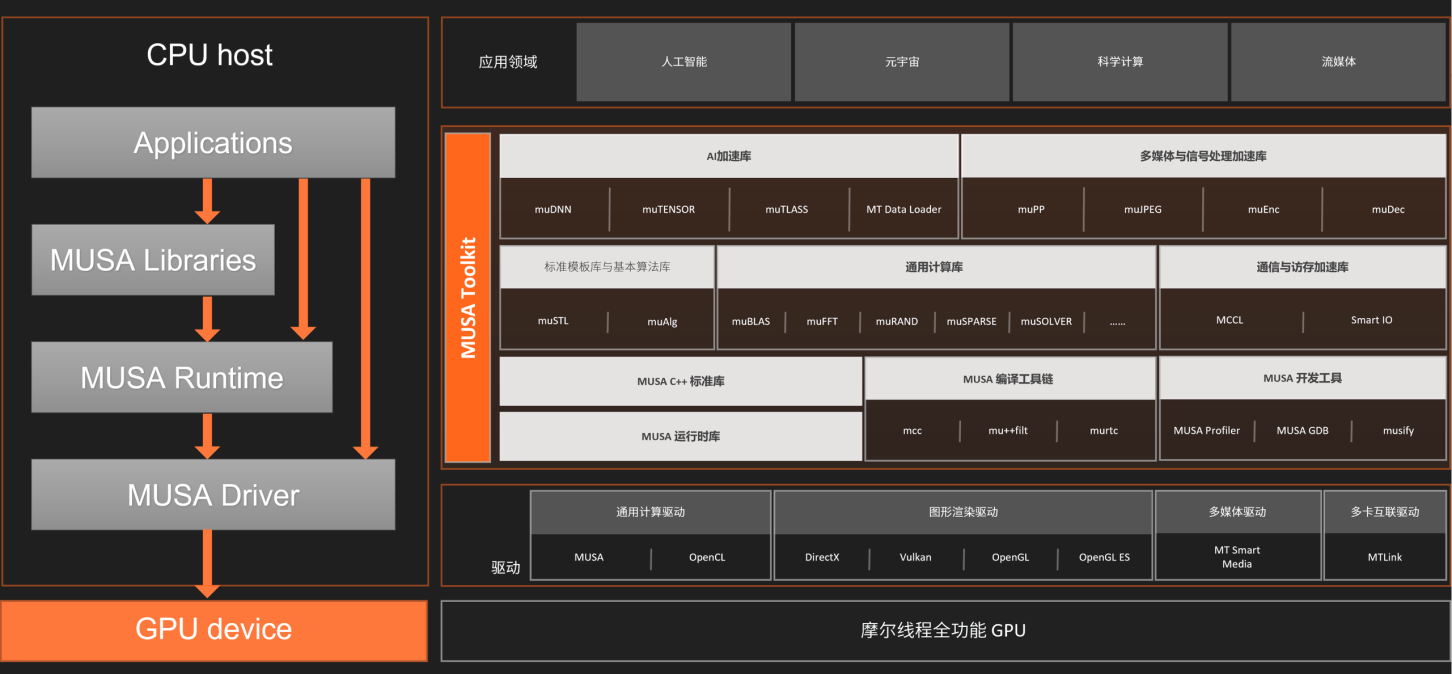
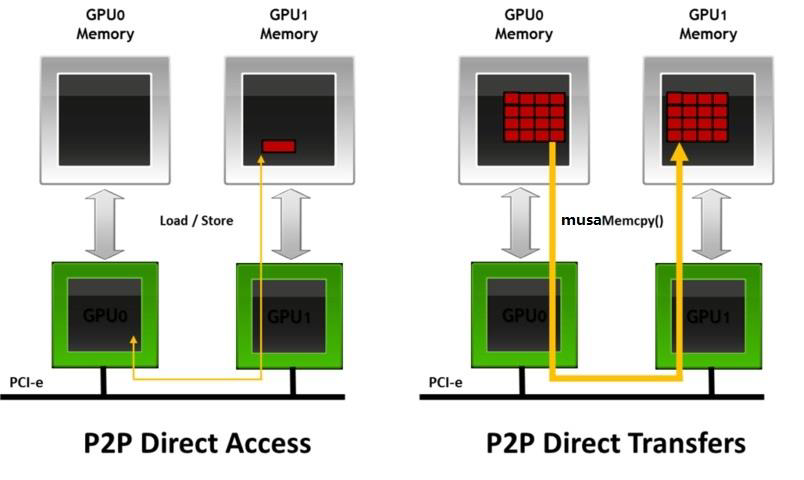
摩尔线程集合通信库 (MCCL) 可实现针对摩尔线程 GPU 和网络进行性能优化的多 GPU 和多节点通信基元。MCCL 提供了 all-gather、all-reduce、broadcast、reduce、reduce-scatter、point-to-point send 和 receive 等原语,这些原语均经过优化,可通过节点内的 PCIe 和 MTLink 高速互联以及节点间的 InfiniBand 网络实现高带宽和低延迟。 MCCL 支持节点内和跨节点通信。可以实现拓扑的自动检测,计算最佳的路径,最终实现 GPUs 之间的高效传输。
torch_musa 是一个基于 PyTorch 的扩展 Python 包。 通过插件的方式开发 torch_musa,可以让 torch_musa 与 PyTorch 解耦,方便代码维护。 与 PyTorch 结合,用户可以通过 torch_musa 充分利用摩尔线程显卡的强大威力。 此外,torch_musa 还有两个显着的优点:
- torch_musa 可以实现 CUDA 兼容,大大减少了适配新算子的工作量
- torch_musa API 格式与 PyTorch 一致,可以让习惯 PyTorch 的用户平滑迁移到 torch_musa
3. MUSA 移植
3.1 分布式训练 demo
基于 huggingface transformers 我们写了一个 CUDA 版本的分布式训练 demo,使用的 NVIDIA 的 NCCL 通信库,如下所示:
main_hf.py
    import os
    import math
    import time
    import json
    import argparse
    import warnings
    import torch
    import torch.distributed as dist
    from itertools import chain
    from torch.nn.parallel import DistributedDataParallel as DDP
    from torch.utils.data import DataLoader
    from torch.utils.data.distributed import DistributedSampler
    from datasets import load_dataset
    from transformers import (
        CONFIG_MAPPING,
        AutoConfig,
        AutoModelForCausalLM,
        AutoTokenizer,
        default_data_collator,
        get_scheduler
    )

    def print_rank_0(message):
        if dist.get_rank() == 0:
            print(message)

    str_to_dtype = {
        "float16": torch.float16,
        "bfloat16": torch.bfloat16,
        "float32": torch.float32,
        "float64": torch.float64,
        "int8": torch.int8,
        "int16": torch.int16,
        "int32": torch.int32,
        "int64": torch.int64,
        "uint8": torch.uint8,
        "bool": torch.bool
    }

    def build_model(args):
        """
        Load pretrained model and tokenizer In distributed training,
        the .from_pretrained methods guarantee that only one local
        process can concurrently download model & vocab.
        """
        config = AutoConfig.from_pretrained(args.model_name_or_path, trust_remote_code=True)

        tokenizer = AutoTokenizer.from_pretrained(
            args.model_name_or_path,
            use_fast=True,
            trust_remote_code=True
        )

        def _modify_config(config):
            with open("override_config.json", "r", encoding='utf8') as fp:
                new_config = json.load(fp)

            for key, value in new_config.items():
                if not hasattr(config, key):
                    print_rank_0(f"WARNING: Invalid config key: {key} and skip override it")
                    continue
                old_value = getattr(config, key)
                if old_value is None:
                    print_rank_0(f"WARNING: config {key} is set None and skip override it")
                    continue
                if key == "torch_dtype":
                    value = str_to_dtype[value]
                if type(old_value) is not type(value):
                    raise TypeError(f"Type mismatch of {key}: {old_value} vs {value}")
                print_rank_0(f"modify {key}: {old_value} -> {value}")
                setattr(config, key, value)

        if os.path.exists("override_config.json"):
            _modify_config(config)

        model = AutoModelForCausalLM.from_pretrained(
            args.model_name_or_path,
            from_tf=bool(".ckpt" in args.model_name_or_path),
            config=config,
            low_cpu_mem_usage=False,
            trust_remote_code=True
        )

        embedding_size = model.get_input_embeddings().weight.shape[0]
        if len(tokenizer) > embedding_size:
            model.resize_token_embeddings(len(tokenizer))
        model.tie_weights()

        return tokenizer, model


    def get_seq_len(config):
        if hasattr(config, "n_positions"):
            seq_len = config.n_positions
        elif hasattr(config, "max_position_embeddings"):
            seq_len = config.max_position_embeddings
        elif hasattr(config, "seq_length"):
            seq_len = config.seq_length
        else:
            raise RuntimeError(
                "Set the correct attribute of config to get seq_len."
            )
        print_rank_0(f"seq_len = {seq_len}")
        return seq_len


    def build_datasets(args, tokenizer, phase):
        assert phase in ["train", "validation", "test"]
        # Downloading and loading a dataset from the hub.
        raw_datasets = load_dataset(
            args.dataset_name_or_path, args.dataset_config_name
        )
        if "validation" not in raw_datasets.keys():
            raw_datasets["validation"] = load_dataset(
                args.dataset_name,
                args.dataset_config_name,
                split=f"train[:{args.validation_split_percentage}%]",
            )
            raw_datasets["train"] = load_dataset(
                args.dataset_name,
                args.dataset_config_name,
                split=f"train[{args.validation_split_percentage}%:]",
            )
        # Preprocessing the datasets.
        # First we tokenize all the texts.
        column_names = raw_datasets["train"].column_names
        text_column_name = "text" if "text" in column_names else column_names[0]

        def tokenize_function(examples):
            return tokenizer(examples[text_column_name])

        preprocessing_num_workers = 16
        tokenized_datasets = raw_datasets.map(
            tokenize_function,
            batched=True,
            num_proc=preprocessing_num_workers,
            remove_columns=column_names,
            load_from_cache_file=True,
            desc="Running tokenizer on dataset",
        )
        # Main data processing function that will concatenate all texts from our dataset and generate
        # chunks of block_size.
        block_size = tokenizer.model_max_length
        if block_size > 1024:
            print_rank_0(
                "WARNING: The chosen tokenizer supports a `model_max_length` that is longer than the default"
                " `block_size` value of 1024. If you would like to use a longer `block_size` up to"
                " `tokenizer.model_max_length` you can override this with `--block_size xxx`."
            )
            block_size = 1024

        def group_texts(examples):
            # Concatenate all texts.
            concatenated_examples = {k: list(chain(*examples[k])) for k in examples.keys()}
            total_length = len(concatenated_examples[list(examples.keys())[0]])
            # We drop the small remainder, we could add padding if the model supported it
            # instead of this drop, you can
            # customize this part to your needs.
            if total_length >= block_size:
                total_length = (total_length // block_size) * block_size
            # Split by chunks of max_len.
            result = {
                k: [t[i : i + block_size] for i in range(0, total_length, block_size)]
                for k, t in concatenated_examples.items()
            }
            result["labels"] = result["input_ids"].copy()
            return result

        # Note that with `batched=True`, this map processes 1,000 texts together,
        # so group_texts throws away a remainde for each of those groups of 1,000 texts.
        # You can adjust that batch_siz here but a higher value might be slowe to preprocess.
        #
        # To speed up this part, we use multiprocessing.
        # See the documentation of the map method for more information:
        # https://huggingface.co/docs/datasets/package_reference/main_classes.html#datasets.Dataset.map
        lm_datasets = tokenized_datasets.map(
            group_texts,
            batched=True,
            num_proc=preprocessing_num_workers,
            load_from_cache_file=True,
            desc=f"Grouping texts in chunks of {block_size}",
        )
        return lm_datasets[phase]


    def record_timestamp():
        torch.cuda.synchronize()
        return time.time()


    if __name__ == "__main__":
        warnings.filterwarnings("ignore", message="promote has been superseded by promote_options='default'.", category=FutureWarning)
        parser = argparse.ArgumentParser(
            description="Pytorch Example of huggingface",
            formatter_class=argparse.ArgumentDefaultsHelpFormatter,
        )
        parser.add_argument(
            "--model_name_or_path",
            type=str,
            default="gpt2",
            help="Path to pretrained model or model identifier from huggingface.co/models.",
            required=False,
        )
        parser.add_argument(
            "--dataset_name_or_path",
            type=str,
            default="wikitext",
            help="The name of the dataset to use (via the datasets library).",
        )
        parser.add_argument(
            "--dataset_config_name",
            type=str,
            default="wikitext-103-raw-v1",
            help="The configuration name of the dataset to use (via the datasets library).",
        )
        parser.add_argument(
            "--batch_size",
            type=int,
            default=2,
            help="Batch size (per device) for the training dataloader.",
        )
        parser.add_argument(
            "--epochs",
            type=int,
            default=100,
            help="the number of training epoch.",
        )
        args = parser.parse_args()

        dist.init_process_group("nccl")
        local_rank = int(os.environ["LOCAL_RANK"])
        world_size = dist.get_world_size()
        device = torch.device("cuda", local_rank)
        torch.cuda.set_device(local_rank)

        torch.manual_seed(123)
        torch.cuda.manual_seed(123)

        tokenizer, model = build_model(args)
        print_rank_0(model)
        model = model.to(device)
        model = DDP(model, device_ids=[device], output_device=device)

        train_dataset = build_datasets(args, tokenizer, "train")
        eval_dataset = build_datasets(args, tokenizer, "test")
        train_dataloader = DataLoader(
            train_dataset,
            collate_fn=default_data_collator,
            shuffle=False,
            batch_size=args.batch_size,
            sampler=DistributedSampler(train_dataset),
        )
        eval_dataloader = DataLoader(
            eval_dataset,
            collate_fn=default_data_collator,
            shuffle=False,
            batch_size=args.batch_size,
            sampler=DistributedSampler(eval_dataset),
        )

        lr = 1e-4 * world_size
        optimizer = torch.optim.AdamW(params=model.parameters(), lr=lr, weight_decay=0.1)
        scheduler = get_scheduler(
            name="cosine",
            optimizer=optimizer,
            num_warmup_steps=100,
            num_training_steps=len(train_dataloader)
        )
        seq_len = get_seq_len(model.module.config)
        for epoch in range(args.epochs):
            train_loss = 0.
            model.train()
            start_time = record_timestamp()
            for batch_idx, batch_data in enumerate(train_dataloader):
                batch_data["input_ids"] = batch_data["input_ids"].to(device)
                batch_data["attention_mask"] = batch_data["attention_mask"].to(device)
                batch_data["labels"] = batch_data["labels"].to(device)

                outputs = model(**batch_data)
                loss = outputs.loss
                torch.nn.utils.clip_grad_norm_(model.parameters(), 1.0)
                loss.backward()
                optimizer.step()
                scheduler.step()
                end_time = record_timestamp()

                train_loss += loss
                duration = end_time - start_time
                train_tokens_throughput = args.batch_size * seq_len * world_size / duration

                if batch_idx % 10 == 0:
                    print_rank_0(
                        f"epoch[{epoch}/{args.epochs-1}], "
                        f"step[{batch_idx}/{len(train_dataloader)-1}]: "
                        f"train_loss: {train_loss.item()/(batch_idx+1)}, "
                        f"train_tokens_throughput: {train_tokens_throughput} tokens/s"
                    )
                    start_time = record_timestamp()

            eval_loss = 0.
            model.eval()
            with torch.no_grad():
                for batch_data in eval_dataloader:
                    batch_data["input_ids"] = batch_data["input_ids"].to(device)
                    batch_data["attention_mask"] = batch_data["attention_mask"].to(device)
                    batch_data["labels"] = batch_data["labels"].to(device)
                    outputs = model(**batch_data)
                    eval_loss += output.loss

            print_rank_0(
                f"validation in train epoch {epoch}: "
                f"eval_loss: {eval_loss.item()/len(eval_dataloader)}, "
                f"val_perplexity: {math.exp(eval_loss.item())}"
            )
其中主要由下面这三行代码调用 hugginface 模型和对应的 tokenizer:
    config = AutoConfig.from_pretrained(args.model_name_or_path, trust_remote_code=True)
    tokenizer = AutoTokenizer.from_pretrained(
        args.model_name_or_path,
        use_fast=True,
        trust_remote_code=True
    )
    model = AutoModelForCausalLM.from_pretrained(
        args.model_name_or_path,
        from_tf=bool(".ckpt" in args.model_name_or_path),
        config=config,
        low_cpu_mem_usage=False,
        trust_remote_code=True
    )
执行如下命令就可以在 A100 上开始训练:
    torchrun --nproc_per_node=2 main_hf.py \
            --model_name_or_path gpt2 \
            --batch_size 1
其中--nproc_per_node 表示训练的 gpu 卡数,--model_name_or_path 表示想要训练哪种模型,–-batch_size 指的单卡 batch_size。
如果训练的模型过大,例如 mixtral-8x7B,那么可以先离线下载好 hugginface checkpoint,然后将–model_name_or_path 设置本地路径。除此之外,如果将 batch_size 设置成 1 后,gpu 的显存不够训练这么大模型,此时可以将 config 里 num_layers 调小,以便快速验证是否在 MUSA 移植成功该模型。此过程可以在 override_config.json 里设置,然后会覆盖原生 config.json 对应的参数值。
override_config.json
{
  "num_layers": 2
}
    def _modify_config(config):
        with open("override_config.json", "r", encoding='utf8') as fp:
            new_config = json.load(fp)
        for key, value in new_config.items():
            if not hasattr(config, key):
                print_rank_0(f"WARNING: Invalid config key: {key} and skip override it")
                continue
            old_value = getattr(config, key)
            if old_value is None:
                print_rank_0(f"WARNING: config {key} is set None and skip override it")
                continue
            if key == "torch_dtype":
                value = str_to_dtype[value]
            if type(old_value) is not type(value):
                raise TypeError(f"Type mismatch of {key}: {old_value} vs {value}")
            print_rank_0(f"modify {key}: {old_value} -> {value}")
            setattr(config, key, value)

    if os.path.exists("override_config.json"):
        _modify_config(config)
3.2 musify
musify 是指将 CUDA 应用修改成 MUSA 应用并在摩尔线程 GPU 跑起来,对于上述 hugginface 训练 demo,musify 的过程非常简单:
musify
    # 1.在main_hf.py里添加torch_musa
    # 2.修改设备:将main_hf.py所有cuda修改成musa
    sed -i "s/cuda/musa/g" `grep -rl "cuda" main_hf.py`
    # 3.修改通信库:将main_hf.py里nccl改成mccl
    sed -i "s/nccl/mccl/g" `grep -rl "nccl" main_hf.py`
修改完之后的 diff 如下所示:

图3 huggingface training demo musify的结果
4. 训练结果展示
我们选了三种典型模型来展示训练结果,分别是:
- Only Encoder 模型:bert-base-uncased
- Only Decoder 模型:gpt2
- MOE 模型:mixtral-8x7B-v0.1
需要注意的是,由于 MUSA 里随机数的生成机制与 CUDA 不同,模型里 dropout 层的输出有较大差异。所以为了验证与 CUDA 的 loss 是否一致,需要关闭模型里的 dropout。然后列了前五十个 step 的训练结果:
| 模型 | num_gpus | override_config.json | batch_size | device | 占用显存/总显存(GB) | 训练截图 |
|---|---|---|---|---|---|---|
| bert-base-uncased | 2 | { "attention_probs_dropout_prob": 0.0, "hidden_dropout_prob": 0.0 } | 56 | A100 | 46/81 |  |
| S4000 | 46/49 |  | ||||
| gpt2 | 2 | { "attn_pdrop": 0.0, "embd_pdrop": 0.0, "resid_pdrop": 0.0, "summary_first_dropout":0.0 } | 16 | A100 | 48/81 |  |
| S4000 | 46/49 |  | ||||
| mixtral-8x7B-v0.1 | 2 | { "num_hidden_layers": 1 } | 1 | A100 | 41/81 |  |
| S4000 | 41/49 |  |
可以看出:
- 占用显存:MUSA 和 CUDA 的占用显存基本一致,甚至在 gpt2 里 MUSA 比 CUDA 的显存还少了 2GB
- 精度:无论是哪种模型,MUSA 和 CUDA 的 loss 误差均在万分位;
- 吞吐:S4000 在 bert-base-uncased,gpt2 和 mixtral-8x7B-v0.1 分别约为 A100 的 0.2 倍,0.24 倍和 0.22 倍,后面还需不断优化在 S4000 上的性能;